Distribution Accounts
Distribution accounts are the Stellar accounts your organization sends funds from. Your organization may have more than one, for example to keep separate programs or funding sources apart.
The Distribution Accounts page shows the account you currently have selected in the account picker.
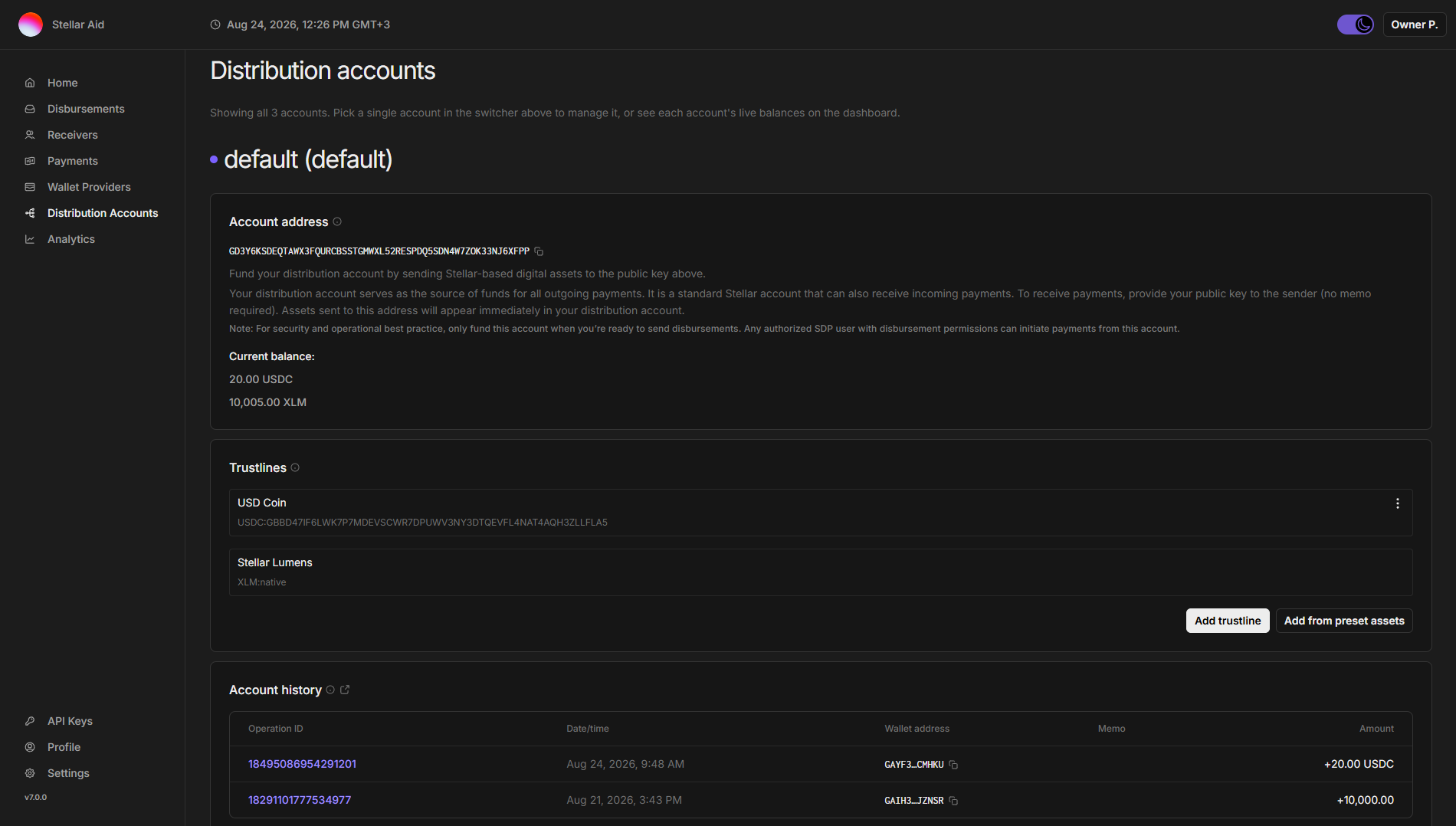
The page includes the following:
- Account name: Each account is shown with its name and its color, and the default account is marked "(default)". Organizations with a single account see it titled simply "Distribution account".
- Distribution account public key: This is your unique identifier for the account on the Stellar network. You use this public key to receive funds in the account.
- Balance: This section displays the current balance of different digital assets in the account:
- USDC, EURC, etc: This is the current balance available for making payments within a disbursement.
- XLM: This is the balance of Stellar Lumens. This is used to fund the account (base reserve) and transaction fees associated with making payments. This is for informational purposes and is not the source of funds for disbursements. In general, you do not need to worry about maintaining this, as Stellar network fees are very low.
- Trustlines: The assets this account is set up to hold. A distribution account must have a trustline to an asset before it can receive or send it.
- Add trustline: Trust any asset by entering its asset code and the issuer's public key. Asset codes are not unique on their own, so check the issuer carefully.
- Add from preset assets: Pick from the assets your organization already has configured, without typing an issuer. Assets the account already trusts are shown as "Already added" and cannot be selected twice.
- Account history: A record of payments to and from this account, taken directly from the Stellar network, with a link to view the account on Stellar Expert.
- Bridge integration: Shown only to the Owner and Financial Controller roles, on the default account only, and when bridge integration has been configured. It sets up a virtual USD bank account you can use to fund the distribution account by bank transfer; deposits are converted to USDC on Stellar and credited to the account automatically.
- Get Started with Bridge: Opts your organization in and starts Bridge's KYC and terms of service checks. The panel then tracks the progress of those checks.
- Create Virtual Account: Appears once both KYC and the terms of service are approved, and issues the virtual account.
- Once the account exists, the panel shows its deposit details and the accepted payment methods instead of a button.
Adding Funds
Add funds to a distribution account: You can deposit Stellar-based digital assets into the account by sending them to the provided public key. Make sure the account has a trustline to the asset before you send funds. As a general principle, do not use a distribution account as a long-term holding place for money. It is meant to be a pass-through wallet to fund disbursements.
Check the account picker before you send funds, so you copy the public key of the account you intend to fund.