Payments
The Payments page provides a list of all payments, detailing each payment's status and related information.
Direct payments are also created from this page: one-off payments sent to a receiver without going through a disbursement.
The list is scoped to the distribution account currently selected in the account picker. You see the payments sent from that account.
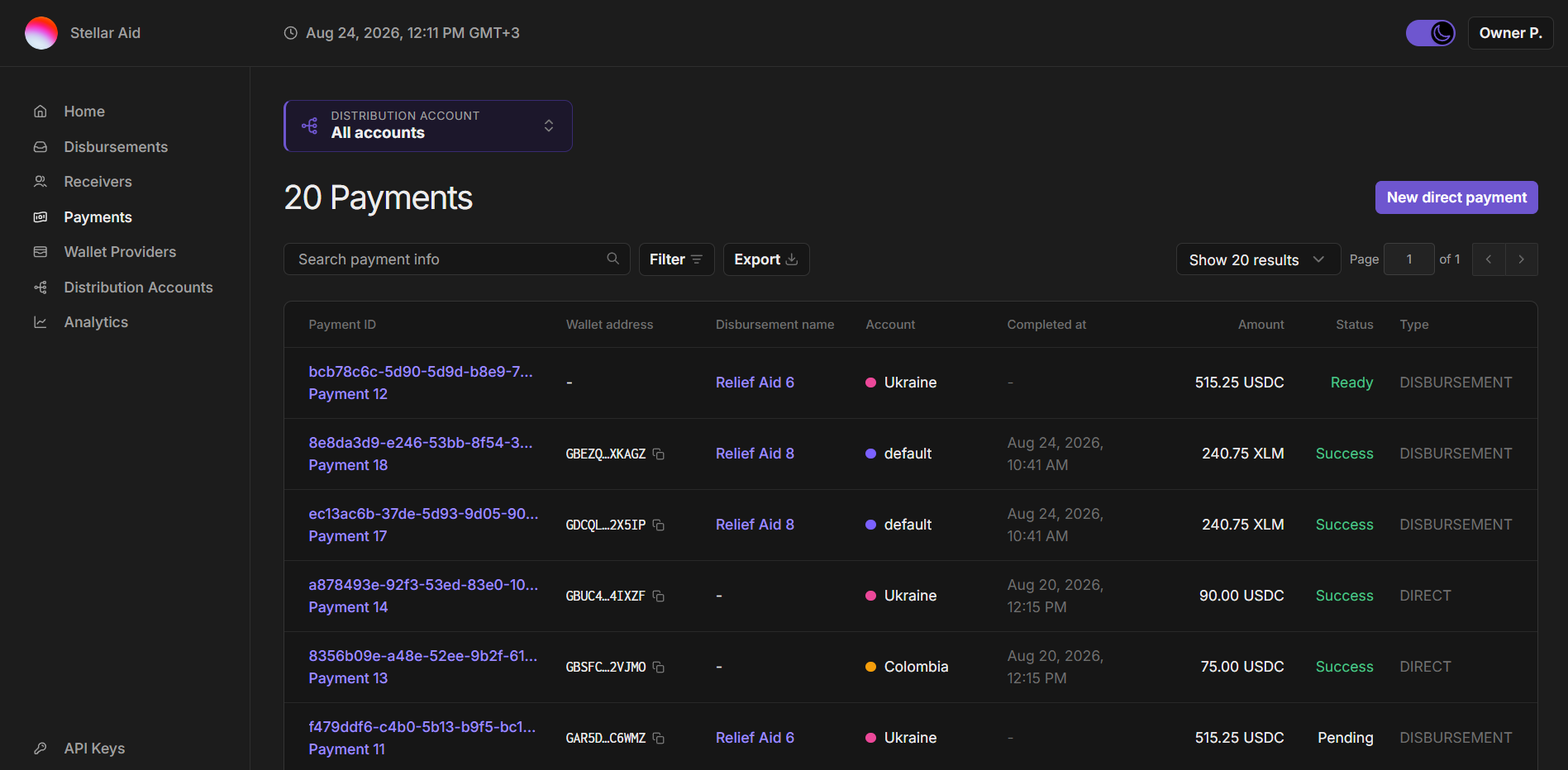
The Payments page includes:
- New direct payment: Send a one-off payment to a receiver without creating a disbursement. You choose which distribution account it is sent from. Only available to the Owner and Financial Controller roles.
- Search payment info: Search by payment ID, external payment ID, receiver wallet address, or disbursement name.
- Filter: This tool allows you to narrow down the payment list based on specific criteria.
- Export: Download the payment list as a CSV. The export applies your current search, filters and selected distribution account.
- Payment Details: Each payment is listed with the following details:
- Payment ID: A unique identifier assigned to each payment. If the payment has an external payment ID from your own system, it is shown beneath the SDP ID.
- Wallet address: The digital wallet address where the payment is sent. A dash ("-") signifies that the wallet address is not yet set. The payment cannot be made until the receiver wallet is created and linked in the SDP.
- Disbursement name: The name of the disbursement associated with the payment.
- Account: The distribution account the payment was sent from. Shown only when 'All accounts' is selected and your organization has more than one account.
- Completed at: The date and time when the payment was completed. A dash ("-") signifies that the payment has not yet been completed.
- Amount: The value of the payment in the appropriate asset.
- Status: The current state of the payment. The options are:
DRAFT: Non-terminal state for payments that were registered in the database but their disbursement has not started yet. Payments in this state can be deleted or transitioned toREADY.READY: Non-terminal state for payments that are waiting for the receiver to register. As soon as the receiver registers, the state is transitioned toPENDING.PENDING: Non-terminal state for payments that were marked by the distribution account's respective platform (currently either TSS or Circle) for submission to the Stellar network. They may or may not have been submitted to the network yet.PAUSED: Non-terminal state for payments that were manually paused. Payments in this state can be resumed.SUCCESS: Terminal state for payments that were successfully submitted to the Stellar network.FAILED: Terminal state for payments that failed when submitted to the Stellar network. Payments in this state can be retried.CANCELED: Terminal state for payments that were either manually or automatically canceled.
- Type: Whether the payment came from a disbursement or was sent as a direct payment.
- You can click into an individual payment to see its details, including a granular status history and Stellar blockchain details.